设置多行显示: 给TextBox控件添加TextWrapping属性,值为Wrap,当文本长度超出TextBox宽度时会自动换行。添加AcceptsReturn属性,值为True,当按回车时,就会换行。 添加水平以及垂直滚动条: 设置VerticalScrollBarVisibility和HorizontalScrollBarVisibility属性,值为Auto.
C#中数据类型的转换
本文不断更新中… string转int :int.Parse(string s) string转float: float.Parse(string s) string转double:double.Parse(string s) string转long,decimal与上类似 其他类型转string:调用ToString()方法
Visual Studio2010常用快捷键集合
本文不断更新中. 选中行注释:Ctrl+K,Ctrl+C ,第一次用VS,对于两次快捷键的组合才能完成命令感到意外. 选中行取消注释:Ctrl+K,Ctrl+U 整行复制:在该行空白处按Ctrl+C 整行剪切:在该行空白处按Ctrl+X或Shift+Delete 代码自动排版对齐:Ctrl+K,Ctrl+D 在类中创建属性:prop+tab+tab 注:prop并非键盘上的键,面是用键盘输入”prop” 查看项目属性:Alt+F7
网页返回 重新启动Activity实例的解决
最近在写一个微博应用,需要用到OAuth授权,机制是这样的,先是客户端向服务器请求一个oauth_token,再根据这个oauth_token构造一个让用户授权的URL,转到浏览器,在浏览器中打开,让用户输入帐号密码.然后通过设置自定义协议让浏览器返回时转到指定的Activity.之前跳转到浏览器和让浏览器返回启动的是同一个Activity,但是发现,浏览器返回时不是调用已启动的Activity的 OnNewIntent 方法,而是重新启动一个实例,导致内存中有两个该Activity实例.通过设置android:launchMode解决:
        <activity android:name=".Main" android:label="@string/app_name" android:launchMode="singleTask">
            <intent-filter>
                <action android:name="android.intent.action.MAIN" />
                <category android:name="android.intent.category.LAUNCHER" />
            </intent-filter>
            <intent-filter>
                <action android:name="android.intent.action.VIEW" />
                <category android:name="android.intent.category.DEFAULT" />
                <category android:name="android.intent.category.BROWSABLE" />
                <data android:scheme="qweibo4android" android:host="OAuthActivity" />
            </intent-filter>
        </activity>
Java 通过SimpleDateFormat把毫秒值的时间转换成需要的格式,转换回Calendar Date
存储时间的时候,先把时间转换成相对于格林威治时间的毫秒值,再存储,就不需要再分别存放年\月\日\时\分\秒了,直接存储毫秒值,需要使用的时候再转换成Calendar,Date或者直接通过SimpleDateFormat格式化输出.
package test;

import java.io.IOException;
import java.text.SimpleDateFormat;
import java.util.Calendar;
import java.util.Date;


public class Main {

    /**
     * @param args
     * @throws IOException
     */
    public static void main(String[] args) throws IOException {
        // TODO Auto-generated method stub
        Calendar c=Calendar.getInstance();
        long milliseconds=c.getTimeInMillis();
        System.out.println("当前时间毫秒值:"+milliseconds);
        //当前时间
        SimpleDateFormat sdf=new SimpleDateFormat("yyyy-MM-dd hh:mm:ss");
        System.out.println("直接格式化毫秒值输出:"+sdf.format(milliseconds));
        //2011-08-20 04:27:16
        Date d=new Date(milliseconds);
        //转换成Date对象
        System.out.println("Date对象输出时间:"+sdf.format(d));
        Calendar c2=Calendar.getInstance();
        System.out.println("Calendar设置前毫秒值:"+c2.getTimeInMillis());
        c2.setTime(d);
        //通过setTime方法转换回Calendar对象
        System.out.println("Calendar设置后毫秒值:"+c2.getTimeInMillis());
    }

}
RelativeLayout的使用实例 类似自定义TabHost效果
TabHost如果要自定义显示的效果,有点麻烦,而默认的样式有时候又与我们程序的风格不匹配.今天我们就用RelativeLayout来实现与TabHost相同的功能.上效果图: 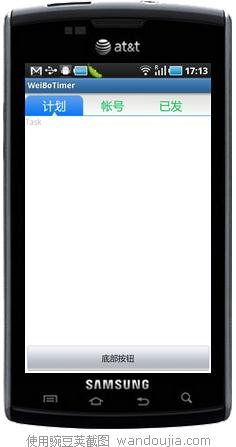 点击上面的tab,tab自身样式会改变,下面内容也会改变,功能完全与TabHost相同. 介绍一下RelativeLayout,RelativeLayout是相对布局,顾名思义,就是说里面的控件位置都是相对其他控件的位置而确定的.如上面的效果,Tab相对于屏幕顶部对齐,底部按钮相对于屏幕底部对齐.而内容则放在顶部的Tab和底部的按钮中间. 所以所有被其他控件依赖定位的控件,必须先写,也就是说,要实现上面的效果,XML中不是从上往下写,而是先定上和下,再写中间,因为中间的内容高度,位置都依赖于它的上下控件. 实现TabHost效果的原理也简单,点击tab时设置被点击和没被点击的的tab的背景,字体颜色即可显示点击效果.在点击事件中,用View的removeAllViews()方法清除中间控件的所有内容,再用addView方法添加需要的内容. 下面上代码,布局XML:
<?xml version="1.0" encoding="utf-8"?>
<RelativeLayout xmlns:android="http://schemas.android.com/apk/res/android"
    android:layout_width="fill_parent" android:layout_height="fill_parent"
    android:weightSum="1" android:background="@color/white">
    <LinearLayout android:id="@+id/topmenu"
        android:orientation="horizontal" android:layout_alignParentTop="true"
        android:layout_width="fill_parent" android:layout_height="40dip"
        android:background="@drawable/topback" android:gravity="bottom">
        <!-- android:layout_alignParentTop 与父元素顶部是否对齐,这里true,就是把这个topmenu放屏幕顶部 -->
        <LinearLayout android:id="@+id/task" android:orientation="horizontal"
            android:layout_height="35dip" android:layout_width="100dip"
            android:background="@drawable/textback">
            <TextView android:layout_width="fill_parent" android:id="@+id/taskText"
                android:layout_height="fill_parent" android:text="计划"
                android:gravity="center" android:textSize="20sp" android:textColor="@color/white" />
        </LinearLayout>
        <LinearLayout android:id="@+id/accounts"
            android:orientation="horizontal" android:layout_height="35dip"
            android:layout_width="100dip">
            <TextView android:layout_width="fill_parent" android:id="@+id/accountsText"
                android:layout_height="fill_parent" android:text="帐号"
                android:gravity="center" android:textSize="20sp" android:textColor="@color/green"
                 />
        </LinearLayout>
        <LinearLayout android:id="@+id/sended"
            android:orientation="horizontal" android:layout_height="35dip"
            android:layout_width="100dip">
            <TextView android:layout_width="fill_parent" android:id="@+id/sendedText"
                android:layout_height="fill_parent" android:text="已发"
                android:gravity="center" android:textSize="20sp" android:textColor="@color/green" />
        </LinearLayout>
    </LinearLayout>


    <Button android:id="@+id/button"
        android:layout_alignParentBottom="true" android:layout_width="fill_parent"
        android:layout_height="wrap_content" android:text="底部按钮" />
        <!-- layout_alignParentBottom 与父元素底部是否对齐,这里true,就是把这个Button放屏幕底部 -->

<!-- RelativeLayout必须先写四周的控件,再写中间的,这里先写顶部的Tab和底部的Button,再写中间的Content,因为中间的内容位置是不固定的 -->
    <LinearLayout android:id="@+id/content"
        android:orientation="vertical" android:layout_width="fill_parent"
        android:layout_height="fill_parent" android:layout_below="@id/topmenu"
        android:layout_above="@id/button"></LinearLayout>
        <!-- layout_below,当前控件放在设定控件下方 .
            android:layout_above 当前控件放在设定控件上方
            这里配合使用,就是放在顶部tab和底部Button的中间
        -->

</RelativeLayout>
程序代码:
package com.pocketdigi;

import android.app.Activity;
import android.os.Bundle;
import android.view.LayoutInflater;
import android.view.View;
import android.view.View.OnClickListener;
import android.widget.LinearLayout;
import android.widget.TextView;

public class Main extends Activity {
    /** Called when the activity is first created. */
    LinearLayout task, accounts, sended, content;
    TextView taskText, accountsText, sendedText;

    @Override
    public void onCreate(Bundle savedInstanceState) {
        super.onCreate(savedInstanceState);
        setContentView(R.layout.main);
        task = (LinearLayout) findViewById(R.id.task);
        accounts = (LinearLayout) findViewById(R.id.accounts);
        sended = (LinearLayout) findViewById(R.id.sended);
        content = (LinearLayout) findViewById(R.id.content);

        taskText = (TextView) findViewById(R.id.taskText);
        accountsText = (TextView) findViewById(R.id.accountsText);
        sendedText = (TextView) findViewById(R.id.sendedText);

        LayoutInflater factory = LayoutInflater.from(this);
        View taskView = factory.inflate(R.layout.task, null);
        View accountsView = factory.inflate(R.layout.accounts, null);
        View sendedView = factory.inflate(R.layout.sended, null);
        //把三个内容视图的XML文件转化成View

        content.addView(taskView);
        //启动时默认载入taskView

        task.setOnClickListener(new TabListener(task, taskText, taskView));
        accounts.setOnClickListener(new TabListener(accounts, accountsText,
                accountsView));
        sended.setOnClickListener(new TabListener(sended, sendedText,
                sendedView));
        //设置三个tab的点击监听器

    }

    class TabListener implements OnClickListener {
        LinearLayout layout;
        TextView tv;
        View subView;

        TabListener(LinearLayout layout, TextView tv, View subView) {
            this.layout = layout;
            this.tv = tv;
            this.subView = subView;
        }

        @Override
        public void onClick(View v) {
            // TODO Auto-generated method stub
            task.setBackgroundDrawable(null);
            accounts.setBackgroundDrawable(null);
            sended.setBackgroundDrawable(null);
            taskText.setTextColor(getResources().getColor(R.color.green));
            accountsText.setTextColor(getResources().getColor(R.color.green));
            sendedText.setTextColor(getResources().getColor(R.color.green));
            // 全部设为未选中状态

            layout.setBackgroundResource(R.drawable.textback);
            tv.setTextColor(getResources().getColor(R.color.white));
            // 设置选中项

            content.removeAllViews();
            //移除所有内容
            content.addView(subView);
            //添加传入的View

        }

    }
}
Strings.xml中存两个颜色值:
    <color name="white">#ffffff</color>
    <color name="green">#0cc054</color>
三个内容视图的xml,只贴一个,另两个一样,名字不同而已: task.xml:
<?xml version="1.0" encoding="utf-8"?>
<TextView
  xmlns:android="http://schemas.android.com/apk/res/android"
  android:layout_width="fill_parent"
  android:layout_height="fill_parent"
  android:text="Task"
  >
</TextView>
Java Socket编程 服务端与客户端通讯 基于SWT
今天学习下Java的Socket编程.为了演示效果更直观,用SWT加了UI,说实话,SWT相当好用,用Eclipse的WindowBuilder插件,可以实现可视化编程,基本上不用学习,再加上SWT跟我们的移动开发没什么关系,所以这部分不解释.今天的例子是一个不完整的聊天室,说它不完整是因为我只是拿它演示客户端与服务器之间的通讯,并没有加入多客户端聊天的功能.上个效果图: 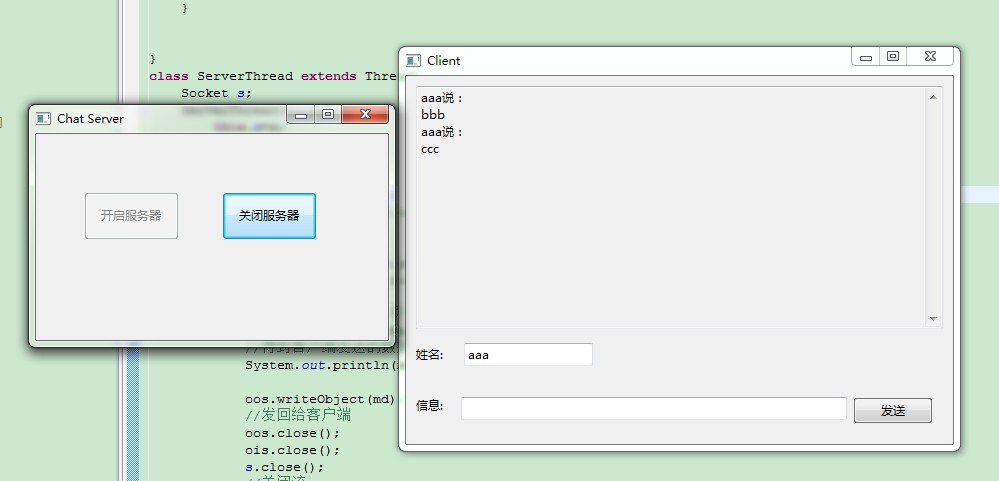 客户端源代码:
package com.pocketdigi;

import java.io.IOException;
import java.io.ObjectInputStream;
import java.io.ObjectOutputStream;
import java.io.OutputStream;
import java.io.Serializable;
import java.net.InetAddress;
import java.net.Socket;
import java.net.UnknownHostException;

import org.eclipse.jface.dialogs.MessageDialog;
import org.eclipse.swt.SWT;
import org.eclipse.swt.events.SelectionAdapter;
import org.eclipse.swt.events.SelectionEvent;
import org.eclipse.swt.widgets.Button;
import org.eclipse.swt.widgets.Display;
import org.eclipse.swt.widgets.Label;
import org.eclipse.swt.widgets.Shell;
import org.eclipse.swt.widgets.Text;

public class ChatClient {


    public static void main(String[] args) throws UnknownHostException, IOException {
        Display display = Display.getDefault();
        final Shell shlClient = new Shell();
        shlClient.setSize(563, 406);
        shlClient.setText("Client");

        final Text showMsg = new Text(shlClient, SWT.BORDER | SWT.V_SCROLL | SWT.MULTI);
        showMsg.setEditable(false);
        showMsg.setBounds(10, 10, 527, 243);


        final Text name = new Text(shlClient, SWT.BORDER);
        name.setBounds(58, 267, 129, 23);

        Label label = new Label(shlClient, SWT.NONE);
        label.setBounds(10, 270, 61, 17);
        label.setText("姓名:");

        Label lblNewLabel = new Label(shlClient, SWT.NONE);
        lblNewLabel.setBounds(10, 321, 43, 17);
        lblNewLabel.setText("信息:");

        final Text msg = new Text(shlClient, SWT.BORDER);
        msg.setBounds(55, 321, 386, 23);


        Button btnSend = new Button(shlClient, SWT.NONE);
        btnSend.setBounds(447, 321, 80, 27);
        btnSend.setText("发送");

        btnSend.addSelectionListener(new SelectionAdapter() {
            @Override
            public void widgetSelected(SelectionEvent e) {
                String nameText=name.getText();
                String msgText=msg.getText();
                //拿到姓名和信息的string
                if(!nameText.equals("")&&!msgText.equals("")){
                    msg.setText("");
                    try {
                        Socket s=new Socket(InetAddress.getByName(null),5555);
                        //连接服务器,后面参数null,就是localhost,服务器不在本机改成IP
                        OutputStream os=s.getOutputStream();
                        ObjectOutputStream oos=new ObjectOutputStream(os);
                        MessageData md=new MessageData(nameText,msgText);
                        //封装一下,比较好处理
                        oos.writeObject(md);
                        //发送数据给服务器

                        ObjectInputStream ois = new ObjectInputStream(
                                s.getInputStream());
                        md = (MessageData) ois.readObject();
                        //接收服务器返回
                        showMsg.append(md.name+"说:\n");
                        showMsg.append(md.msg+"\n");
                        //显示在上面的Text框中

                        oos.close();
                        ois.close();
                        s.close();
                        //关闭流
                    } catch (Exception e1) {
                        // TODO Auto-generated catch block
                        MessageDialog.openError(shlClient, "发送失败", "信息发送失败");
                        e1.printStackTrace();
                    }
                }
            }
        });


        shlClient.open();
        shlClient.layout();
        while (!shlClient.isDisposed()) {
            if (!display.readAndDispatch()) {
                display.sleep();
            }
        }
    }
}
class MessageData implements Serializable{
    String name;
    String msg;
    MessageData(String name,String msg){
        this.name=name;
        this.msg=msg;
    }
    @Override
    public String toString() {
        return "MessageData [msg=" + msg + ", name=" + name + "]";
    }
}
服务器端:
package com.pocketdigi;

import java.io.IOException;

public class Server {

    /**
     * Launch the application.
     *
     * @param args
     * @throws IOException
     */
    static ServerSocket ss;
    static boolean stopFlag = false;

    public static void main(String[] args) throws IOException {
        Display display = Display.getDefault();
        Shell shlChatServer = new Shell();
        shlChatServer.setSize(368, 244);
        shlChatServer.setText("Chat Server");

        final Button stop = new Button(shlChatServer, SWT.NONE);
        stop.setBounds(186, 58, 95, 48);
        stop.setText("关闭服务器");

        final Button start = new Button(shlChatServer, SWT.NONE);
        start.setBounds(48, 58, 95, 48);
        start.setText("开启服务器");

        start.addSelectionListener(new SelectionAdapter() {
            @Override
            public void widgetSelected(SelectionEvent e) {
                //开启按钮
                stopFlag = false;
                start.setEnabled(false);
                stop.setEnabled(true);
                //设置按钮是否可用
                try {
                    ss = new ServerSocket(5555);
                    //监听端口5555
                    new Thread(){
                        public void run(){
                            while (!stopFlag) {
                                Socket s;
                                try {
                                    s = ss.accept();
                                    //接受客户端连接
                                    new ServerThread(s).start();
                                    //收到连接后开启新线程给客户端服务
                                } catch (IOException e) {
                                    // TODO Auto-generated catch block
                                    e.printStackTrace();
                                }
                            }
                        }
                    }.start();

                } catch (IOException e3) {
                    // TODO Auto-generated catch block
                    e3.printStackTrace();
                }

            }
        });


        stop.addSelectionListener(new SelectionAdapter() {
            @Override
            public void widgetSelected(SelectionEvent e) {
                //关闭服务器按钮
                stopFlag = true;
                stop.setEnabled(false);
                start.setEnabled(true);
                try {
                    ss.close();
                } catch (IOException e1) {
                    // TODO Auto-generated catch block
                    e1.printStackTrace();
                }

            }
        });


        shlChatServer.open();
        shlChatServer.layout();
        while (!shlChatServer.isDisposed()) {
            if (!display.readAndDispatch()) {
                display.sleep();
            }
        }
        //SWT的内容,不解释
    }


}
class ServerThread extends Thread{
    Socket s;
    ServerThread(Socket s){
        this.s=s;
    }
    public void run(){
        try{
            OutputStream os = s.getOutputStream();
            ObjectOutputStream oos = new ObjectOutputStream(
                    os);

            InputStream is = s.getInputStream();
            ObjectInputStream ois = new ObjectInputStream(
                    is);
            //以上顺利不可倒,必须先out,再in,否则可能出现死锁,服务器跟客户端都等待对方发送数据
            MessageData md = (MessageData) ois.readObject();
            //得到客户端发送的数据
            System.out.println(md);

            oos.writeObject(md);
            //发回给客户端
            oos.close();
            ois.close();
            s.close();
            //关闭流
            }catch(Exception e){

            }

    }
}
直接把对象存入文件 ObjectOutputStream与ObjectInputStream的使用
ObjectOutputStream可以把对象直接存入到文件中,然后利用ObjectInputStream读取文件还原成对象,前提是该对象实现了Serializable接口.由于ObjectInputStream无法判断文件流中对象的数量,所以我们在循环读取的时候,只好写个死循环,然后捕捉EOFException异常,来实现把所有对象读进来.也可以在写入文件时,把所有对象存进ArrayList,然后把这个ArrayList写入文件,这样就不需要判断对象数量了.
package com.pocketdigi;

import java.io.EOFException;
import java.io.FileInputStream;
import java.io.FileOutputStream;
import java.io.IOException;
import java.io.ObjectInputStream;
import java.io.ObjectOutputStream;
import java.io.Serializable;

public class Main {

    public static void main(String[] args) throws IOException {
        FileOutputStream fop=new FileOutputStream("d:/a.txt");
        ObjectOutputStream oos=new ObjectOutputStream(fop);
        People p=new People(1,"zhang");
        oos.writeObject(p);
        p=new People(2,"li");
        oos.writeObject(p);
        p=new People(3,"zhao");
        oos.writeObject(p);
        //写入三个对象
        oos.close();
        //关闭输出流
        FileInputStream fis=new FileInputStream("d:/a.txt");
        ObjectInputStream ois=new ObjectInputStream(fis);
        try {
            while(true){
            People p2=(People)ois.readObject();
            System.out.println(p2);
            }
            //没有办法判断文件中对象的数量,所以,只有通过EOFException异常来中断
            //或者在写入的时候把所有的对象都放到一个ArrayLis里,这样就不需要判断了
        } catch (ClassNotFoundException e) {
            // TODO Auto-generated catch block
            e.printStackTrace();
        }catch(EOFException e){
            System.out.println("读取结束");
        }

    }

}
class People implements Serializable{
    //必须实现Serializable接口
    int id;
    String name;
    People(int id,String name){
        this.id=id;
        this.name=name;
    }


    public String toString(){
        return "id:"+id+" name:"+name;
    }

}
RandomAccessFile类的使用 随机访问文件
RandomAccessFile可以通过getFilePointer得到当前文件位置,也可以通过seek 方法直接跳到指定的位置读写数据.另外还可以直接操作基本数据类型,而不必转化成String(直接用记事本打开看到是乱码).
package com.pocketdigi;

import java.io.IOException;
import java.io.RandomAccessFile;

public class Main {

    public static void main(String[] args) throws IOException {
        RandomAccessFile raf=new RandomAccessFile("d:/a.txt","rw");
        //构建RandomAccessFile对象,以读写模式
        People p=new People(1,"zhang");
        p.write(raf);
        p=new People(2,"li");
        p.write(raf);
        p=new People(3,"zhao");
        p.write(raf);
        //写入三条数据
        raf.seek(0);
        //把指针移动回文件开头
        for(long i=0;i
BufferedInputStream和BufferedOutputStream用法 解决乱码
BufferedInputStream和BufferedOutputStream是过滤流,需要使用已存在的节点来构造,即必须先有InputStream或OutputStream,相对直接读写,这两个流提供带缓存的读写,提高了系统读写效率性能.BufferedInputStream读取的是字节byte,因为一个汉字占两个字节,而当中英文混合的时候,有的字符占一个字节,有的字符占两个字节,所以如果直接读字节,而数据比较长,没有一次读完的时候,很可能刚好读到一个汉字的前一个字节,这样,这个中文就成了乱码,后面的数据因为没有字节对齐,也都成了乱码.所以我们需要用BufferedReader来读取,它读到的是字符,所以不会读到半个字符的情况,不会出现乱码.
package com.pocketdigi;

import java.io.BufferedInputStream;
import java.io.BufferedOutputStream;
import java.io.BufferedReader;
import java.io.File;
import java.io.FileInputStream;
import java.io.FileOutputStream;
import java.io.IOException;
import java.io.InputStreamReader;

public class Main {

    public static void main(String[] args) throws IOException {
        File f = new File("d:/a.txt");
        FileOutputStream fos = new FileOutputStream(f);
        // 构建FileOutputStream对象,文件不存在会自动新建
        BufferedOutputStream bos = new BufferedOutputStream(fos);
        bos.write("1我是中文".getBytes());
        bos.close();
        // 关闭输出流,写入数据,如果下面还要写用flush();
        // 因为是BufferOutputStream链接到FileOutputStream,只需关闭尾端的流
        // 所以不需要关闭FileOutputStream;
        FileInputStream fis = new FileInputStream(f);
        BufferedInputStream bis = new BufferedInputStream(fis);
        BufferedReader reader = new BufferedReader (new InputStreamReader(bis));
        //之所以用BufferedReader,而不是直接用BufferedInputStream读取,是因为BufferedInputStream是InputStream的间接子类,
        //InputStream的read方法读取的是一个byte,而一个中文占两个byte,所以可能会出现读到半个汉字的情况,就是乱码.
        //BufferedReader继承自Reader,该类的read方法读取的是char,所以无论如何不会出现读个半个汉字的.
        StringBuffer result = new StringBuffer();
        while (reader.ready()) {
            result.append((char)reader.read());
        }
        System.out.println(result.toString());
        reader.close();


    }
}